|
|
Important information to ensure you receive our emails
Many web-based email providers have automatic spam filtering which may prevent our emails to you from appearing in your inbox.
AOL
1. Login to your AOL account
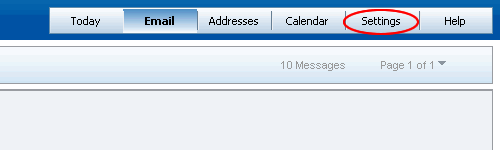
2. Select 'Settings' from the menu on the right
3. Select 'Spam Controls' from the menu on the left
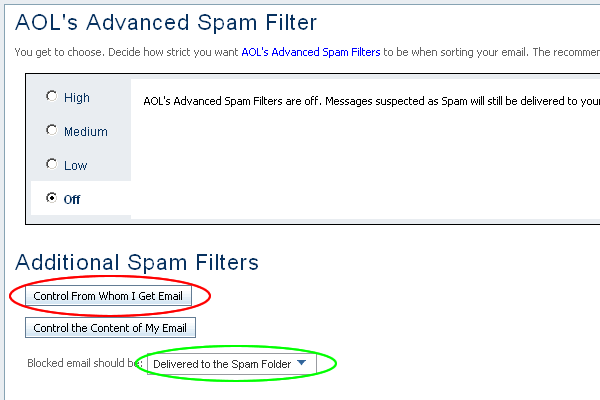
4. You should now see the Spam Filter page (see below). First, change the 'Blocked Email Should Be:' drop down menu to 'Deliver to Spam Folder'(circled in green), this will make sure if 'englishlads.com' is seen as spam then it can be recovered. Next, Select the 'Control From Whom I Get Email' button (circled in red), a new window should appear.
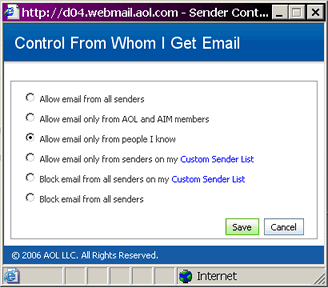
5. Depending on your preferences, in this window (below), select the option to 'Allow Email From People I know' (or 'Allow email from all Senders') and click 'save' below these options.
You should have now returned to the Spam Filter page, click the 'Save' button near the base of the page.
6. Next, go to the 'Addresses' page (select the 'Addresses' option from the menu to the above right).
Here, you have to click n the 'New' option and select 'New Contact from the menu that appears.
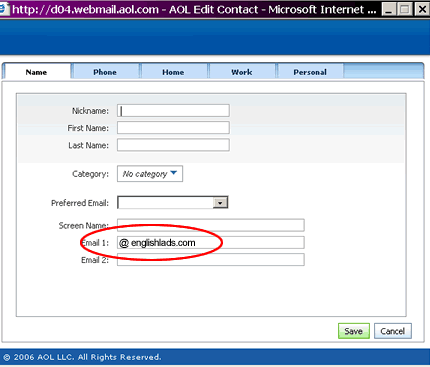
The window below should appear. In this window type '@englishlads.com' into the 'Email 1:' field. Then select 'Save'.
Your email service should now accept emails from englishlads.com.
|
|